
DRAFT — under teacher review.
Use Case Diagram (UCD)
The Hamilton and Alexandra College · Year 12 · 2026
A use case diagram shows who can do what with your system. Actors (the who) sit outside the system boundary; use cases (the what) sit inside. It is the third of the three C02 analytical diagrams and is hand-drawn under timed conditions in the C2-2 validation.
Most C2-2 marks lost on UCDs come from one of three things: forgetting an actor, putting the system boundary in the wrong place, or pointing the «include» / «extend» arrows the wrong way. This page covers all three.
What it shows
A use case diagram answers two questions in one picture:
- Who interacts with the system? (Actors — people and external systems)
- What can each one do? (Use cases — functions the system performs for them)
It is not a flowchart. It says nothing about the order of actions, the user interface, or how a function is implemented. Save those for other diagrams.
The three building blocks
| Element | Symbol | Rule |
|---|---|---|
| Actor | Stick figure, outside the system rectangle | A person or external system that interacts with yours. Examples: Teacher, Student, Payment Gateway, Email Server. |
| Use case | Oval, inside the system rectangle | A function the system performs for an actor. Named verb-noun: "View Timetable", "Generate Report Card". |
| System boundary | Rectangle around the use cases | The labelled scope of the software you're building. Actors live outside; use cases live inside. |
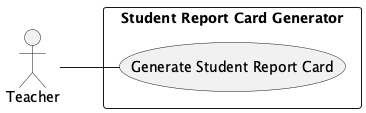
Worked example: simplest possible UCD
One actor, one use case, one system. "A Teacher can generate a student report card."
Worked example: a multi-actor system
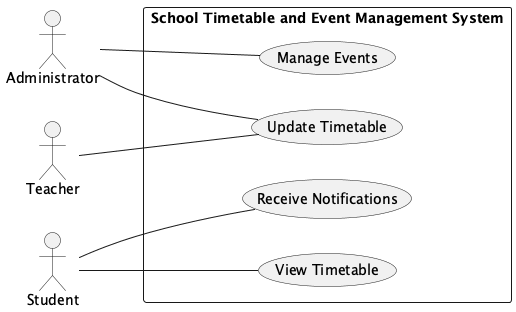
Same notation, more actors and use cases. Each actor has at least one solid line to a use case (an association).
The four relationships
Different lines mean different things. Master these four and you have everything C2-2 needs.
1. Association (actor ↔ use case)
Solid line between an actor and a use case. "This actor participates in this use case." This is the most common relationship — every actor needs at least one.
Student ———— View Timetable
2. Generalisation (actor → actor, or use case → use case)
Solid line with a hollow triangle pointing to the parent. The child inherits everything the parent can do. Useful for role hierarchies (an Administrator can do everything a Teacher can, plus more).
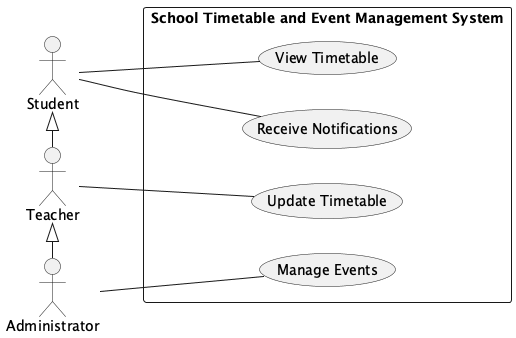
Administrator ──▷ Teacher ──▷ Student
In this example, Student is associated only with View Timetable and Receive Notifications — but because Teacher generalises Student, a Teacher inherits those associations too. The diagram only draws the new associations at each level.
3. Include (use case → use case, always required)
Dashed line with «include» label, arrow pointing TO the included use case. "The base use case always does this other use case as part of its work."
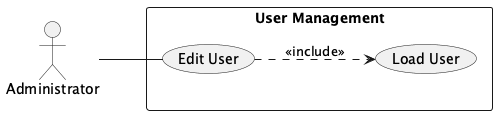
Edit User ┄┄«include»┄┄▷ Load User
You can't edit a user without first loading them — so Edit User includes Load User. Every time Edit User runs, Load User runs.
4. Extend (use case → use case, optional)
Dashed line with «extend» label, arrow pointing TO the base use case. "This other use case sometimes runs as an addition to the base."
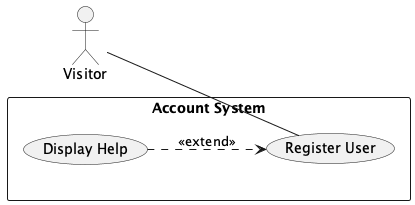
Display Help ┄┄«extend»┄┄▷ Register User
Help is optional — most users register without ever opening it. So Display Help extends Register User. The base use case (Register User) doesn't know or care whether the extension fires.
Arrow direction trap
The «include» and «extend» arrows point in opposite directions. Easy way to remember:
- «include» — arrow points to the use case that's being used by the base.
- «extend» — arrow points to the use case that's being added to.
In both cases, the arrow points toward whatever the relationship is named for: include points at the included; extend points at the extended.
Most common UCD mistakes
- Actor inside the system boundary. Actors are external — they always sit outside the rectangle. If your stick figure is inside, you've made a notation error.
- Use case outside the system boundary. Use cases describe what your system does. If an oval is outside the rectangle, it's not part of your system.
- Pointing «include» the wrong way. Arrow goes from the base use case to the included one (Edit User → Load User), not the other way.
- Pointing «extend» the wrong way. Arrow goes from the extension to the base use case (Display Help → Register User). This trips up nearly everyone — practise it.
- Use cases as nouns or UI elements. "Login Page" or "Database" is not a use case. Use cases are verb-noun phrases describing what the system does: "Login", "Save Profile".
- Forgetting non-human actors. A payment gateway, an email server, an external API — all actors. See What Is an Entity? — the same logic applies here.
How to draw one (the reliable order)
- Identify your actors — work from your user characteristics and your data-collection findings. Don't forget non-human external systems.
- List your use cases — translate each functional requirement into a verb-noun use case.
- Draw the system boundary — a labelled rectangle. Use cases go inside; actors stay outside.
- Connect actors to use cases with solid lines (associations). Every actor needs at least one.
- Add «include» and «extend» relationships between use cases — only where they genuinely apply. Don't force them.
- Check arrows. Walk through every dashed line and confirm direction.
Why VCAA cares
The C2-2 rubric at 5–6 asks for "illustrates the relationships between the existing system, entities and data flows" on the use case diagram. "Some errors or omissions" is acceptable at this band.
At 9–10, it requires "no errors, inconsistencies or omissions". The notation rules above are the difference between 7 and 10 — every wrong arrow direction, every actor inside the boundary, is an error that costs you the top band.
Check Your Understanding
Answer in your head first, then click the spoiler to check.
1. A login system always verifies credentials before granting access. How should this appear on a UCD? (a) Login generalises Verify Credentials · (b) Login includes Verify Credentials · (c) Login extends Verify Credentials · (d) Login and Verify Credentials are independent use cases
(b) Login includes Verify Credentials. "Always" is the trigger word for «include». Arrow goes from Login to Verify Credentials (Login → Verify Credentials).
2. A registration form optionally shows a tooltip if the user clicks a help icon. How should this appear? (a) Show Tooltip includes Register · (b) Show Tooltip extends Register · (c) Register includes Show Tooltip · (d) Register extends Show Tooltip
(b) Show Tooltip extends Register. "Optionally" is the trigger word for «extend». Arrow goes from the extending use case (Show Tooltip) to the base (Register): Show Tooltip → Register.
3. Which of these is not a valid use case label? (a) Submit Order · (b) Generate Report · (c) Login Page · (d) Cancel Booking
(c) Login Page. Use cases are verb-noun phrases describing what the system does, not UI elements. "Login" would be valid; "Login Page" describes a screen, not a function.
4. An Administrator can do everything a Teacher can, plus extra admin tasks. Which relationship best models this? (a) Association · (b) Include · (c) Extend · (d) Generalisation
(d) Generalisation. Administrator generalises Teacher — meaning Administrator inherits all of Teacher's associations and adds its own. Drawn as a solid line with a hollow triangle pointing to the parent (Teacher).
See also
- What Is an Entity? — same actor-discovery logic; non-human entities count as actors too
- Context Diagram and Context Diagram vs Data Flow Diagram — the other two C02 diagrams; entity/actor names should match across all three
- Excalidraw Diagram Starters — pre-framed UCD canvas you can use to rehearse before the timed validation
- Essential Terms — definitions of actor, use case, system boundary, include, extend, generalisation
← Back to VCE Software Development Hub